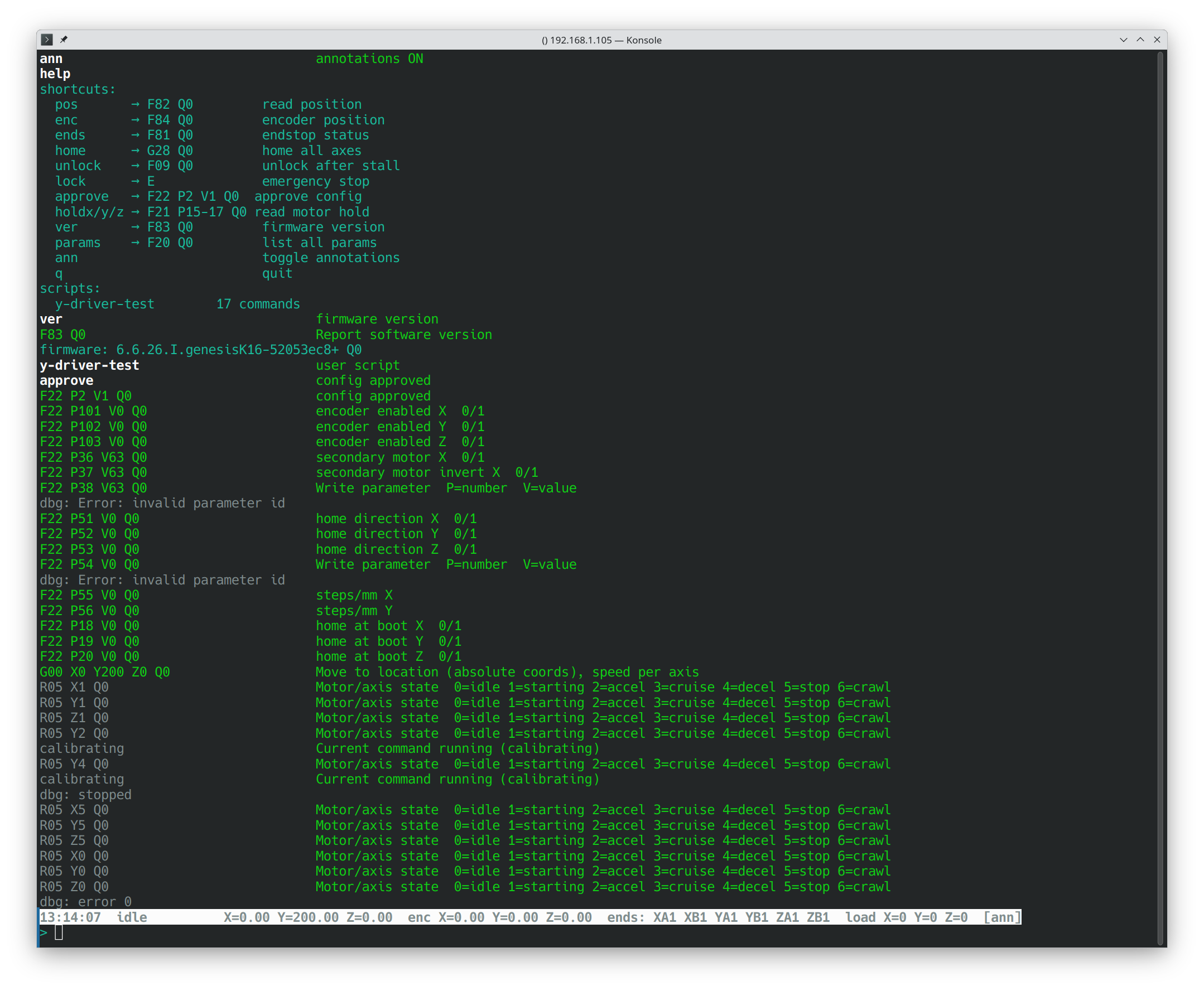
farmduino_monitor – a developer console for Farmduino diagnostics
Hi everyone,
I’ve been having issues with my motors on Genesis v1.6 and needed a way to talk directly to the Farmduino over USB – without FarmBot OS in the way – so I could test individual motors, read driver status and debug my own custom firmware.
I ended up writing a small terminal tool and thought it might be useful to others, so I’m sharing it here.
farmduino_monitor is an interactive serial console for Farmduino. It connects over USB and gives you a full-screen terminal UI (think mc or htop) with:
Real-time status line – position, encoder values, endstops, motor load, stall detection
Scrolling event log – all firmware responses decoded and colour-coded
Built-in shortcuts – approve, pos, home, unlock, lock, ver, params and more
Raw command input – type any G/F-code directly (F22 P36 V63 Q0 etc.)
Command annotations – type ann to toggle inline descriptions from the firmware README next to every command and response
Scripts – put a .txt file in scripts/, one command per line, run it by name; inline # comments supported
Session log – everything saved to logs/ with kernel-style timestamps
Tested against firmware v6.6.26 (52053ec8, FARMDUINO_V32 + K16) on Genesis v1.6.
Why I built it
FarmBot OS does a great job but when something goes wrong at the hardware level – a driver not responding, a motor with no torque, endstops reading wrong – it’s hard to isolate the problem through the web UI. I needed to:
send commands to a single motor without the others connected
read TMC2130 driver status (DRV_STATUS via the patched firmware)
iterate quickly on parameter changes without restarting FBOS
This tool fills that gap. It’s essentially a smarter minicom that speaks Farmduino’s R/F/G-code protocol.
Happy to hear if anyone finds it useful or has suggestions. If you’re debugging motor or driver issues on Genesis v1.5/1.6 (TMC2130 boards) it might save you some time.
Hi, python is just rapid prototyping, I like C. Maybe next step. Now I wish to manage the farmduino this way and drop the farmbot web server and farmbot OS because a) does nothing b) MIPI and openCV or interference of a video on remote ai host is soo difficult c) reliability and difficulty of the code is over complicated d) modularity of the architecture is very poor e) error handling is very bad for rpi voltage, mipi camera, farmduino hw issues (my X2 driver is dead and I want to switch to AUX which 1. is unsupported even in farmduino code 2. there is no way to link the drivers a different way). So I want to change the architecture completely, drop the buildroot and use yocto instead with mender and strong security and finally run it on real embedded HW like intel. I want more from the farmbot…
and connect the X2-motor to the AUX-output (leaving encoder circuitry connected as is)?
If I understand correctly this would just replace the broken TMC2130 of the X2-module with the (hopefully intact) TMC chip of the AUX module