Hi @dlmcshan a few things:
- In the future, please do not post personal information such as your email address. You can find your device ID, which is not considered sensitive information. on the connectivity panel (click the green dot on the top navigation bar).
- Tracking changes: As a note to anyone who might be reading this thread: it is possible to see which motor tuning values differ from factory defaults. Any value with a yellow border around it indicates a non-default value. This is useful for resetting values that have been changed erroneously.
- X motor jerkiness: Consider setting your
ACCELERATE FOR (MM)value back to 12 mm/s. This is an advanced setting that very few users need to change. Although some users do like to tune this value, I have never needed to change it on any devices I own. You may wish to set the Z values back to their defaults, also (or not, if you find that they operate fine with the values you have entered). - Viewing logs for the currently executed sequence: The web app supports this. Visit the logs page and enable the options shown below to activate this feature:
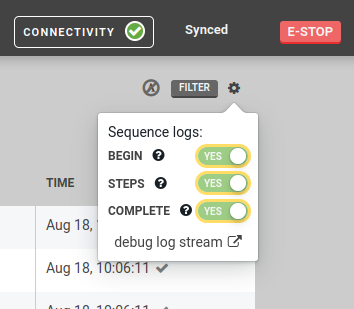
Please let me know how the motors behave after resetting the X value to default and we can go from there.